
Blog
Information on JSQ, LLC's projects and products including DianHua Dictionary for iOS
DianHua Dictionary v1.2.1 Awaiting Approval
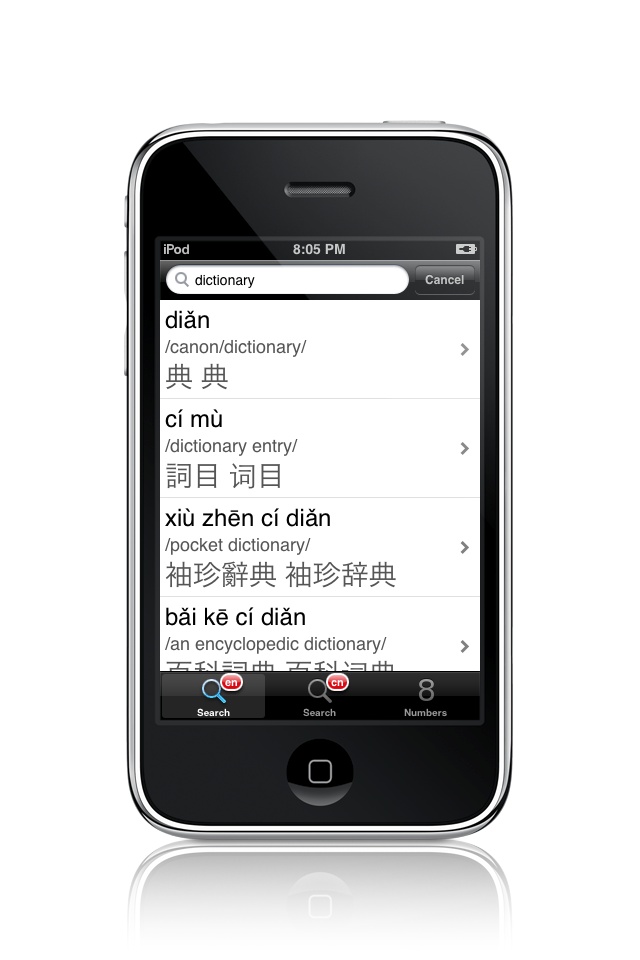
DianHua Dictionary v1.2.1 has been sent to Apple for approval. Included in this update are the following bug fixes and enhancements:
- Corrected a bug where scrolling the view during a search could cause a crash.
- Traditional and Simplified Characters are no longer clipped in the search results.
- Added the Search field cancel button to close the keyboard for unintentional touches.
- Added support for Traditional and Simplified character searches from the English search tab.
- Improved quality of search results across all searches.
- Improved performance for some search results.
- Upgraded to the 08-29-2008 CC-CEDICT release.
- Implemented a dictionary entry page showing complete details of the entry selected from the search results.
- Implemented Settings to allow control of the fonts used to display search results.
- Fixed problems with leading and trailing whitespace in search terms.
JSQLLC.com Registration E-mail Problems
I’ve tracked down the problem with the site’s e-mail configuration. I went ahead and activated all of the accounts that have been created in the last week.
DianHua Dictionary BETA Install Instructions
By e-mail, you should have received a copy of the JSQ, LLC Provisioning Profile with your device ID. To install:
- Drag and Drop the Provisioning Profile on the iTunes icon.
- Download DianHua.zip
- Unzip the archive creating DianHua.app
- Drag and Drop DianHua.app on the iTunes icon.
- Connect your device and sync.
If everything works correctly, you should now have DianHua 1.2.1 on your iPhone or iPod touch. Step 1 is only necessary the first time you install a BETA. After that, you can start at step 2.
Screenshots of 1.2.1
DianHua Dictionary 1.2.1 is just about ready to go. Here are a few screenshots to whet your appetite.
 |
 |
 |
|
There are a few things to note in these screenshots as the changes may not be readily obvious.
- Cí Diǎn now shows up in the search for dictionary. English search algorithms have been improved slighty.
- All fonts are configured through settings. Fonts for each line in the dictionary entry can be specified separately.
- Touching an entry will bring up a more complete dictionary entry page with English definitions divided one per line.
- Chinese searches now typically yield a more accurate result in the initial position but still do a less exact search than Pinyin and English.
2.0.2 Firmware
I noticed that a review on the App Store indicated that the user was unsuccessful running DianHua Dictionary on 2.0.2. After some testing tonight, I can’t find any problem specifically with 2.0.2. I use an iPod™ touch for development and use AdHoc distribution to further test on my own phone. Both are now running 2.0.2 without issue.
Having said that, I did also get a support report today from a user who is unable to start DianHua Dictionary. I’m inquiring further about firmware version, but if anyone else has seen any problems, please let me know.
Update 08-26-2008: The user who contacted me was able to get DianHua Dictionary to work be performing a full restore of his iPhone™. If you decide to take this approach, please remember to backup important data off of your device.
How Much Do You Want in 1.2.1, the First Update?
 Many thanks to everyone who has taken the time to download and experiment with DianHua Dictionary. There are some great recommendations coming from iTunes™, our support form here, and in the comments of some of the blog posts. The question now is how much do you want in the first update? Given the time it takes updates to appear on the App Store, it might be nice to fine-tune several items at once, but I could rush out a fix for the character clipping issue as fast as Apple could approve it. However, I’m leaning toward squeezing some more functionality into the first update. Right now, my plans are to:
- Make fonts on the search results user-configurable as you see in the Settings page mock-up here.
- Improve the search algorithms to yield more exact entries. That includes both expanding the English->Chinese results and scaling back on the Chinese->English results.
- Add a definition page when you press on an entry in the Search results. This would allow you to see the full English definition and view the characters in a more readable font size.
So, what are your thoughts? I’m already working on all of the above, but if there’s a high demand, I can quickly release a 1.2.1 with the character clipping issue fixed.
Missing the Obvious…Chinese Characters Clipped
Many thanks to Irene for letting me know the tops of Chinese characters are getting clipped in my dictionary listing. It’s an embarrassing miss on my part, but I’ll correct it as soon as possible.
DianHua Dictionary Now Available on the App Store
Late yesterday evening, DianHua Dictionary went live on Apple’s™ iTunes™ App Store. If you have any questions about the application or want any further information, please do not hesitate to ask.
Fixed in 1.2.1: Why is “Cí Diǎn” missing when you search for “dictionary”?
This is an unfortunate oversight on my part. The search query in DianHua’s English side is a little too exacting, and when I switched from public domain CEDICT to CC-CEDICT at the last minute, I didn’t notice the entry disappeared. We’ll make the search more configurable in the next version, but in the meantime, use a percent sign (%) to add some flexibility to the search. For instance, you can search for “dictionary%” and find the missing entry.
Update: Wildcard searches no longer work, and many of the basic search issues have been fixed. If you encounter other incorrect or incomplete search results, please let us know.
Almost There…
Apple™ informed me today that DianHua Dictionary is “Ready for Sale”. I initially thought that meant it was already in the App Store, but I was wrong. After a little research on the developer forum, what that seems to mean is that it could show up in the App Store anytime in the next couple of days.